Understanding Objects in JavaScript
When we start learning JavaScript, we usually store simple values like names, numbers, or booleans in variables. But real-world data is often more complex.
For example, imagine you want to store information about a person:
Name
Age
City
Instead of creating separate variables for each value, JavaScript allows us to group related information together using objects.
Objects are one of the most important concepts in JavaScript and are used everywhere in modern web development.
What Are Objects in JavaScript?
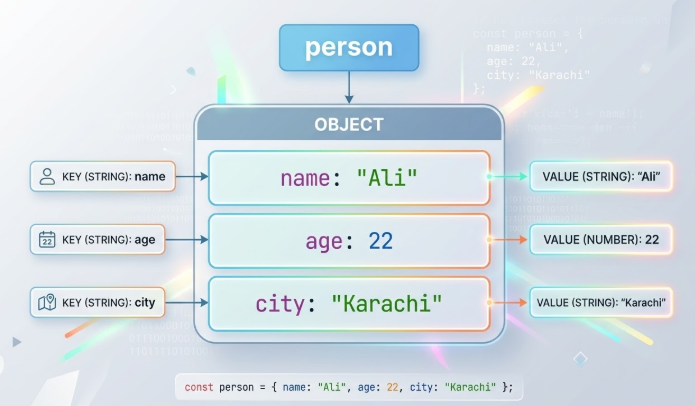
An object is a collection of related data stored as key-value pairs.
Think of it like a profile card where each piece of information has a label.
Example:
let person = {
  name: "Ali",
  age: 22,
  city: "Karachi"
};
Here:
| Key | Value |
|---|---|
| name | "Ali" |
| age | 22 |
| city | "Karachi" |
Each piece of information is called a property.
Creating Objects
Objects are created using curly braces {}.
Example:
let student = {
  name: "Sana",
  age: 21,
  course: "Web Development"
};
This object stores information about a student.
Objects help keep related data organized and easy to manage.
Accessing Object Properties
There are two ways to access properties in JavaScript objects.
1️⃣ Dot Notation
This is the most common way.
let person = {
  name: "Ali",
  age: 22
};

console.log(person.name);
Output:
Ali
2️⃣ Bracket Notation
We can also use square brackets.
console.log(person["age"]);
Output:
22
When to Use Bracket Notation
Bracket notation is useful when the property name is stored in a variable.
let key = "name";
console.log(person[key]);
Updating Object Properties
We can easily update values inside an object.
Example:
let person = {
  name: "Ali",
  age: 22
};

person.age = 23;

console.log(person.age);
Output:
23
Here we changed the value of age.
Adding New Properties
JavaScript objects are flexible, which means we can add new properties anytime.
Example:
let person = {
  name: "Ali",
  age: 22
};

person.city = "Karachi";
Now the object becomes:
{
  name: "Ali",
  age: 22,
  city: "Karachi"
}
Deleting Properties
We can also remove properties using the delete keyword.
Example:
let person = {
  name: "Ali",
  age: 22,
  city: "Karachi"
};

delete person.city;
Now the city property is removed.
Looping Through Object Keys
Sometimes we want to print all properties of an object.
We can use the for...in loop.
Example:
let student = {
  name: "Sana",
  age: 21,
  course: "Web Development"
};

for (let key in student) {
  console.log(key, student[key]);
}
Output:
name Sana
age 21
course Web Development
This loop goes through each key in the object.
Difference Between Array and Object
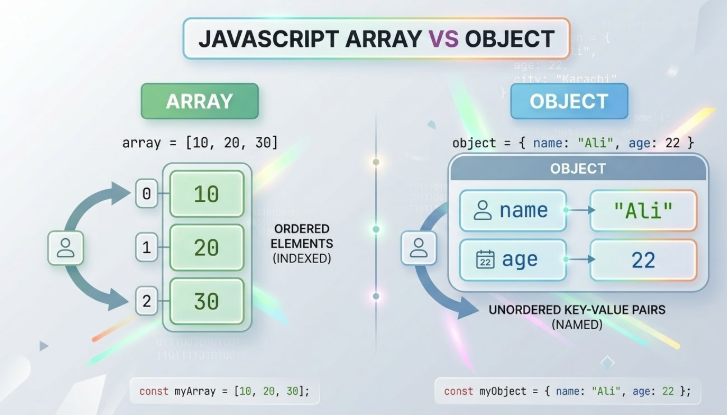
Arrays and objects both store data, but they work differently.
| Array | Object |
|---|---|
| Stores values in order | Stores data as key-value pairs |
| Uses index numbers | Uses property names |
Example: [10,20,30] |
Example: {name:"Ali"} |
Example:
let numbers = [10, 20, 30];

let person = {
  name: "Ali",
  age: 22
};
Assignment Example
Let’s create a student object and work with it.
let student = {
  name: "Sana",
  age: 21,
  course: "Web Development"
};
Update One Property
student.age = 22;
Loop Through Keys
for (let key in student) {
  console.log(key + ": " + student[key]);
}
Output:
name: Sana
age: 22
course: Web Development
Final Thoughts
Objects are a powerful feature in JavaScript that allow us to store and organize related data in a structured way.
Instead of managing many separate variables, objects help keep information together and make programs easier to read and maintain.
As you continue learning JavaScript, you’ll see objects used everywhere—from user data to APIs and full web applications.